Auto-Layout for Single Line Diagrams: A Fun Little Problem
May 14, 2026 · Single Line Diagrams · Auto-Layout · Graph Algorithms
I recently built an open-source electrical single line diagram editor (sldeditor). One part of it looks unremarkable but went through several rounds of polishing: auto-layout.
What it does is simple: given a set of components and connections, compute each component’s (x, y, rotation) on the canvas. But getting the result to “look right” is far harder than getting it to “not throw errors.” This post is a casual walk through how the algorithm is designed and the pitfalls I hit along the way.
Why this isn’t easy
A single line diagram (SLD) is the standard technical drawing for substations and power distribution systems. A typical one has a few defining traits:
- Busbars are horizontal, components hang vertically, and chains of switches run from top to bottom
- Busbars of the same voltage sit on the same horizontal line (typical double-busbar or three-section busbar layouts)
- Transformers connect high-voltage busbars to low-voltage busbars, which naturally creates “tiers” across voltage levels
- Wiring is tidy with no crossings, and leads on the same electrical node stay close to each other
None of these constraints seems like much on its own, but together they make an interesting little problem: layout here is not a physical gravity-or-spring simulation; it is a set of structured domain aesthetics. A diagram produced by a generic force-directed graph drawing algorithm is instantly recognizable to a practitioner as machine-made: twisted wires, slanted busbars, transformers lying sideways in the middle.
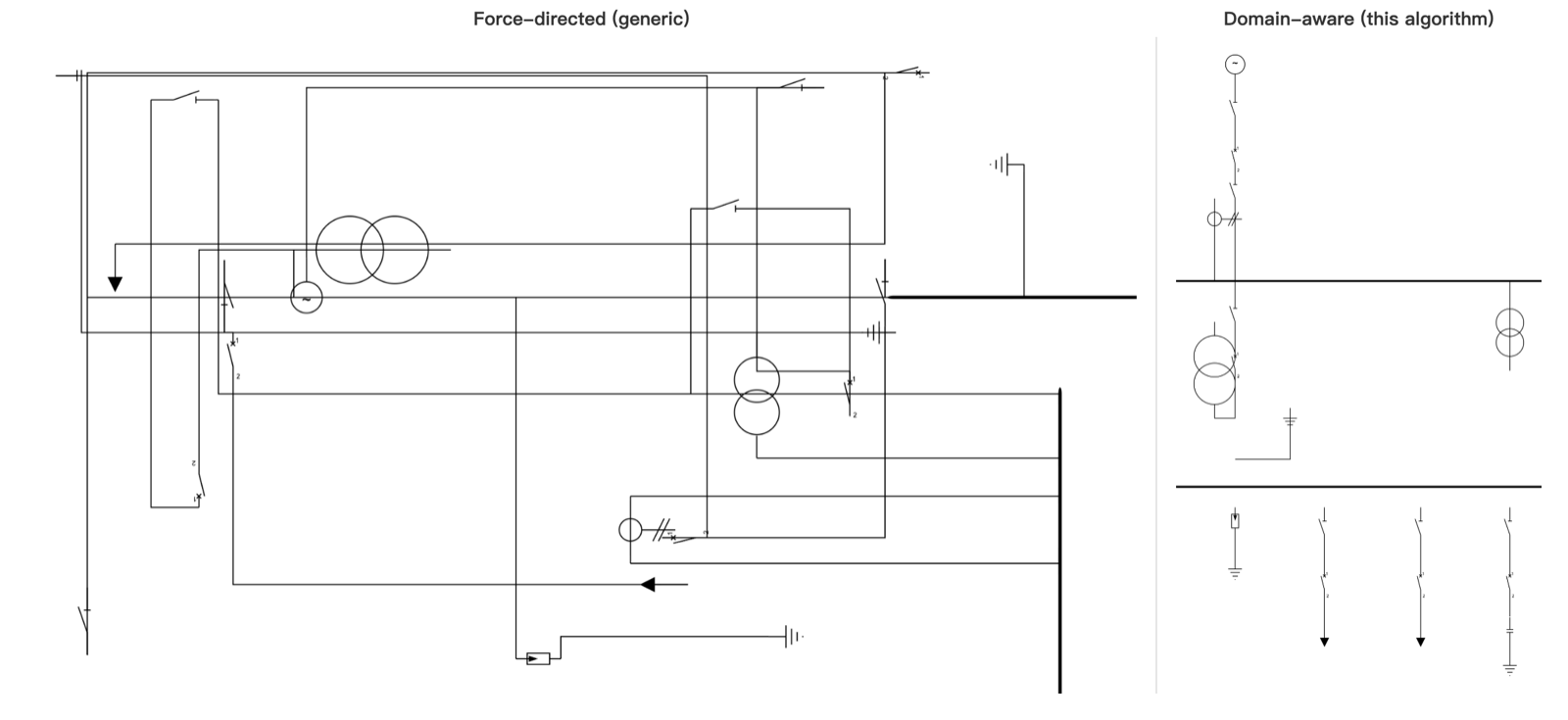
To get diagrams that “look hand-drawn by an electrical engineer,” the domain rules have to be encoded into the algorithm itself. I split the algorithm into several fairly independent layers; let’s go through them one at a time.
Component library: model the “shape” right first
Each component (circuit breaker, disconnector, transformer, load…) is defined in the component library as a piece of SVG plus a set of terminals:
{
  "id": "breaker",
  "viewBox": "-7 -22 15 46",
  "width": 15,
  "height": 46,
  "svg": "...",
  "terminals": [
    { "id": "t1", "x": 0, "y": -20, "orientation": "n" },
    { "id": "t2", "x": 0, "y":  20, "orientation": "s" }
  ]
}
A terminal has a position (in the component’s local coordinates) and an orientation (the direction the lead goes out). Together these form the physical basis of layout: “snapping a terminal onto a busbar” is equivalent to translating the component to busbar coordinate - terminal local coordinate. Rotate the component 180° and the terminal orientations flip with it.
This seemingly mundane modeling determines how clean everything downstream can be. If a component only had a width and height but no terminal positions, you couldn’t align electrical nodes precisely; if terminals had no orientation, you couldn’t tell whether “once this switch is attached to the busbar, the chain should grow upward or downward.”
Busbar / chain / node: three core abstractions
The whole layout algorithm revolves around three concepts:
A busbar is the horizontal “main axis” that components hang from. The busbar itself is a line segment whose width (span) is computed dynamically from what it carries.
A chain is a sequence of components connected end to end, extending from a busbar in one direction. For example, a feeder: busbar → disconnector → breaker → load. Each component in the chain occupies one column, stacked vertically according to orientation.
An electrical node is a set of terminals “at the same potential,” physically connected to the same copper bar or the same junction point. Nodes are implicit in the source data: the JSON contains a number of connection arrays (members pairwise share a point), and the algorithm merges them into equivalence classes with union-find.
The union-find step looks like a pure data-structure concern, but it directly decides “who should sit next to whom” during placement later on. Early versions had no explicit notion of a node and placed components chain-style, one pair at a time, by walking connection groups. When three parallel branches hung off the same junction, BFS would cram them into a single vertical column: the second and third queued up behind the first, and even ran into the busbar.

Once “node” became a first-class citizen, this class of problem disappeared immediately: all unplaced elements on the same node simply fan out perpendicular to the lead as parallel branches.
Tiers: stack busbars vertically, or lay them side by side?
This is the layer of the algorithm I find most subtle.
Intuitively, multiple busbars should just stack one below another. But that intuition falls apart with a double busbar (two 220 kV busbars plus a bus-tie breaker): two busbars of the same voltage level should spread left and right and share one horizontal line, not stack vertically.
The fix is to assign each busbar a tier. Starting from the source busbar, run BFS: crossing a transformer (a vertical linker) moves down one tier, crossing a bus tie (a horizontal linker) stays on the same tier. Busbars on the same tier share a Y coordinate and spread horizontally; the Y spacing between tiers is determined dynamically by the length of the transformer chain.
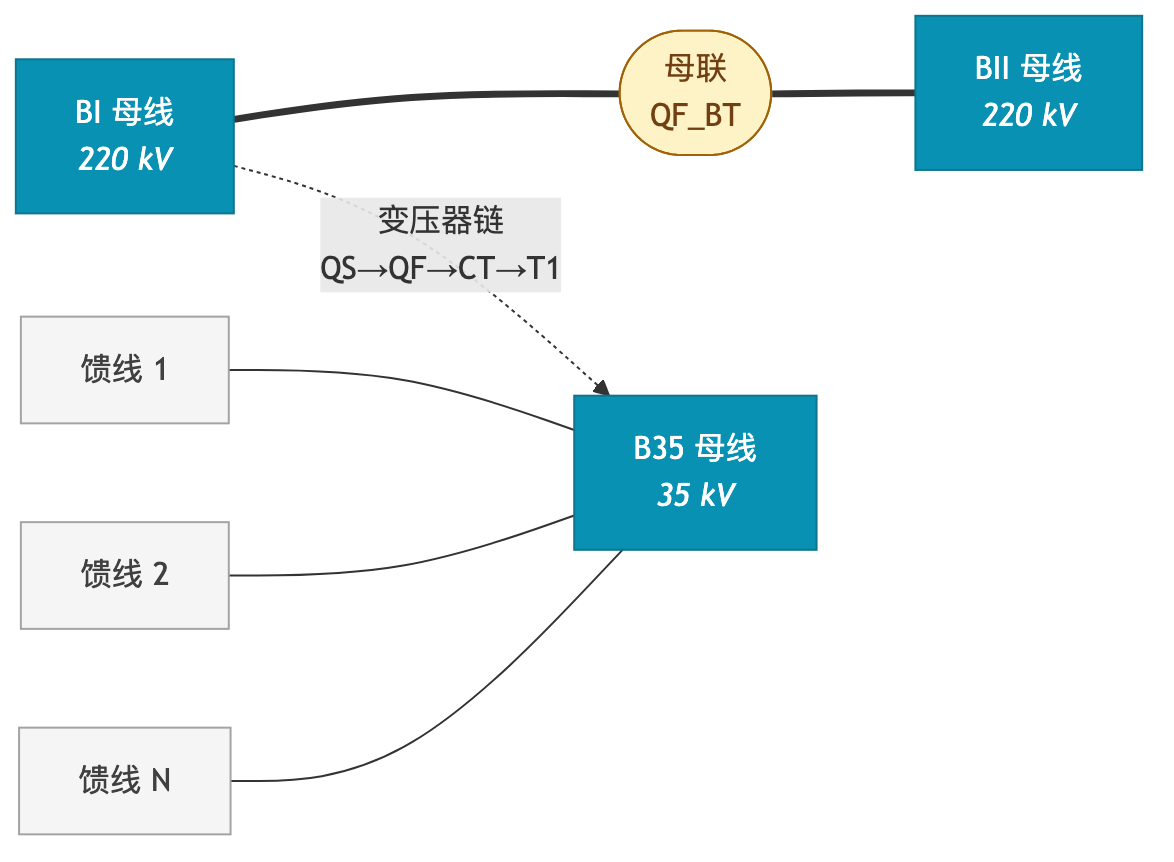
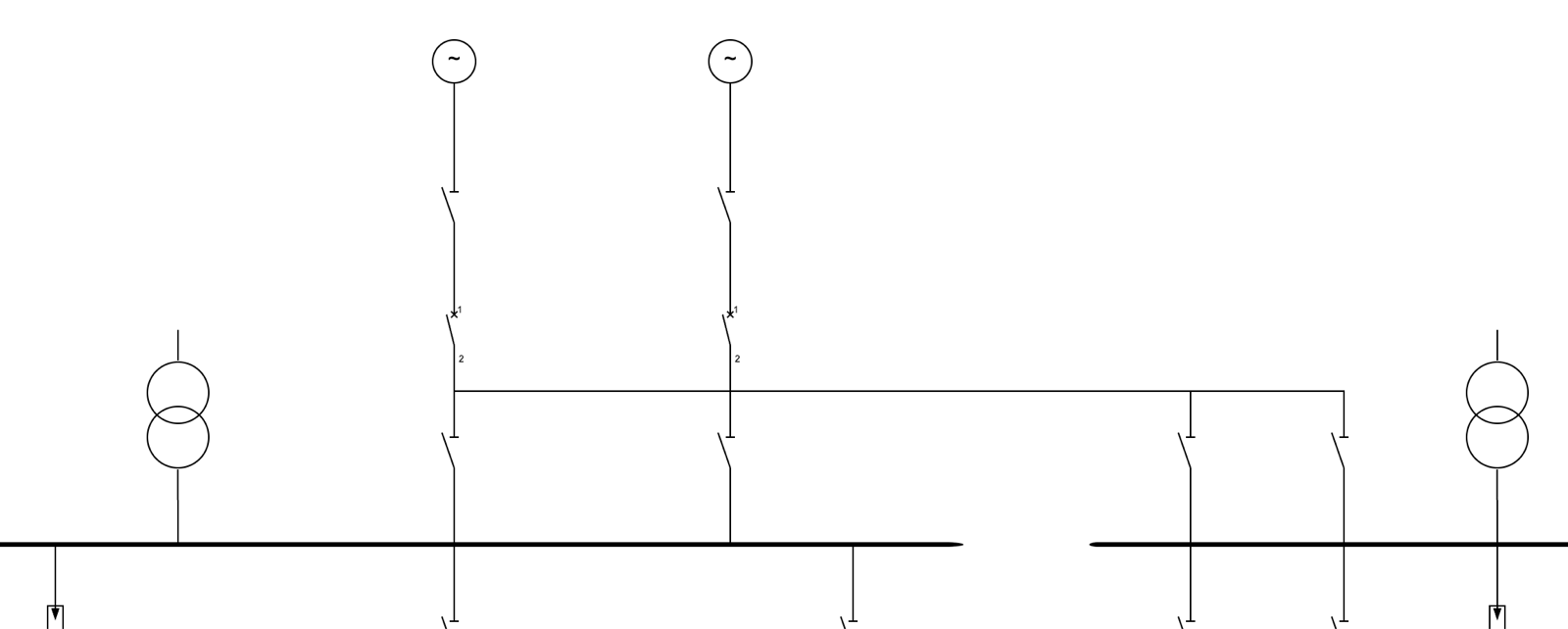
Whether a linker is horizontal or vertical isn’t configured; it is detected automatically. Transformers use one kind of BFS (“find ≥2 distinct busbars, with paths passing through itself”), bus ties use another (“BFS from each of the two terminals reaches a different busbar, and the paths may not pass through a transformer”). That second rule is crucial: it lets the algorithm distinguish a “line breaker” (one side is the grid, not a linker) from a “bus-tie breaker” (both sides are busbars, a linker) without any user annotation.
Widths propagate bottom-up
A busbar’s width (span) is not fixed; it is computed recursively from the bottom up.
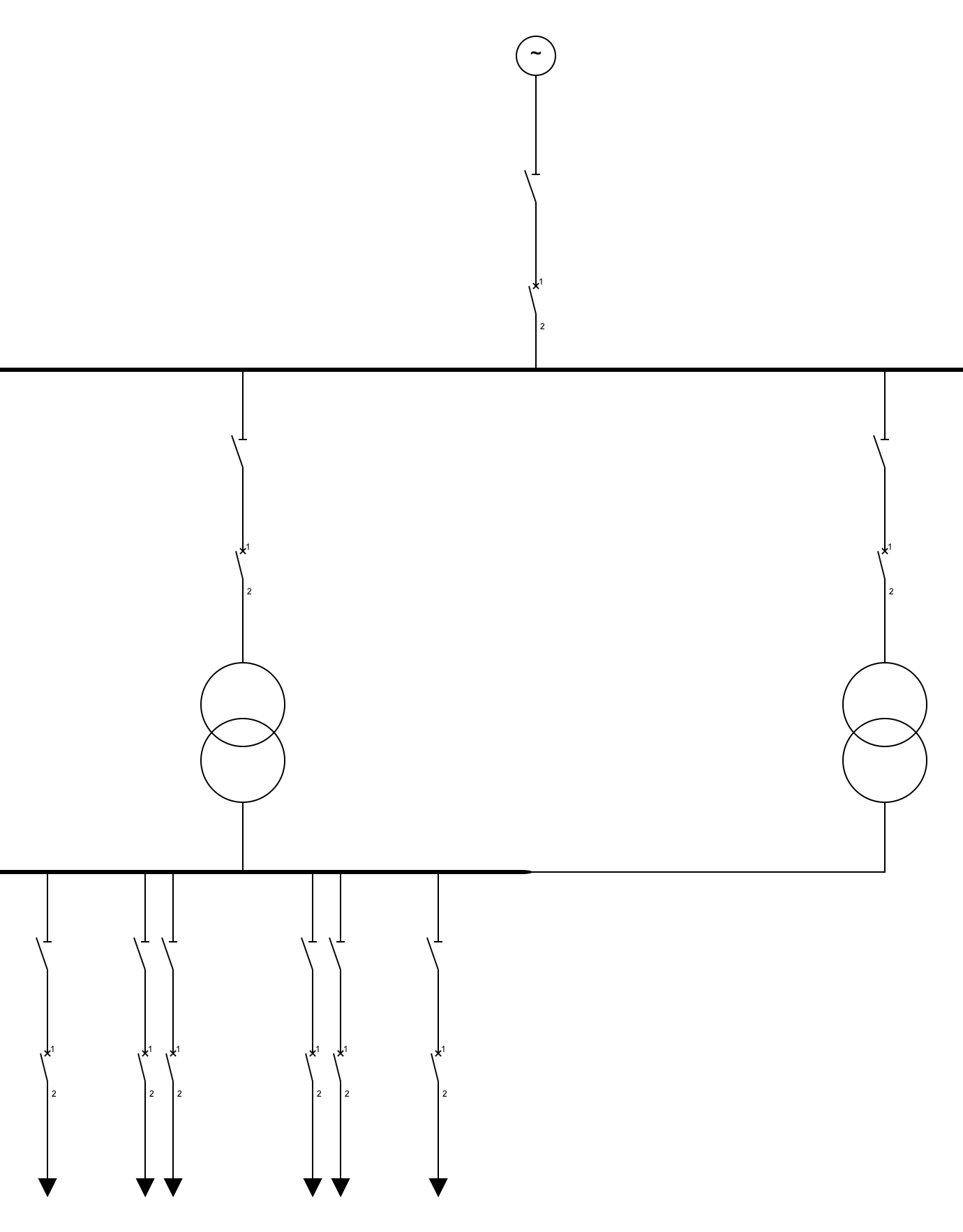
The sum of the widths of the “slots” hanging below a busbar, plus some margin, is the minimum width it needs. For an ordinary component, the slot width is just its own SVG width (rounded up to a minimum spacing). But if a slot is an “entry point to a child busbar” (say, the high-voltage lead of a transformer), its slot width must be ≥ the child busbar’s width + spacing; otherwise two child busbars would overlap horizontally on the canvas.
The rule propagates recursively upward: B2 carries 4 feeders → B2 is about 400px wide → the T1 slot on B1 is ≥ 480px. If B1 also carries T2 (leading to B3), then B1 needs at least 800px so that B2 and B3 don’t overlap on screen. This was the step in the whole algorithm that took me longest to think through. Once each busbar’s width is known, the rest (“which X does this busbar go at, and which X do its children go at”) is almost mechanical: center the parent busbar, and put each child busbar at the X of its corresponding slot.
Parallel branches: nodes + voting + fixed point
Next comes arranging the components that hang below busbars. This is another counterintuitive part: two terminals being on the same electrical node ≠ they should be placed next to each other.
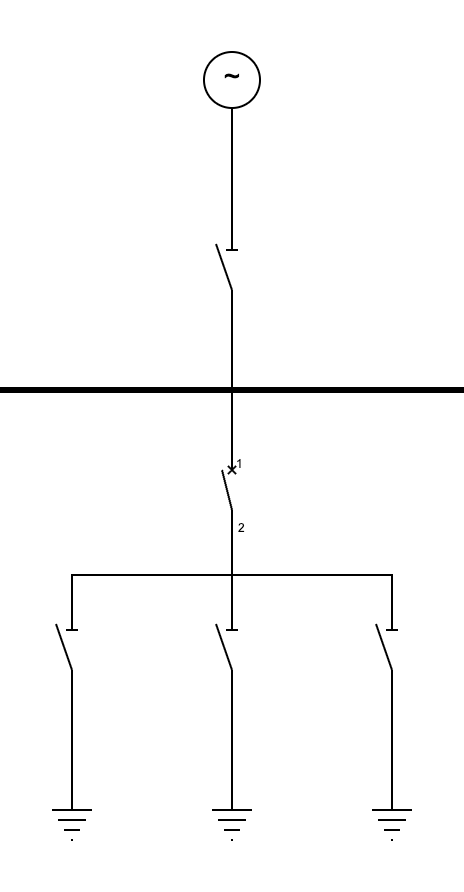
A concrete example:
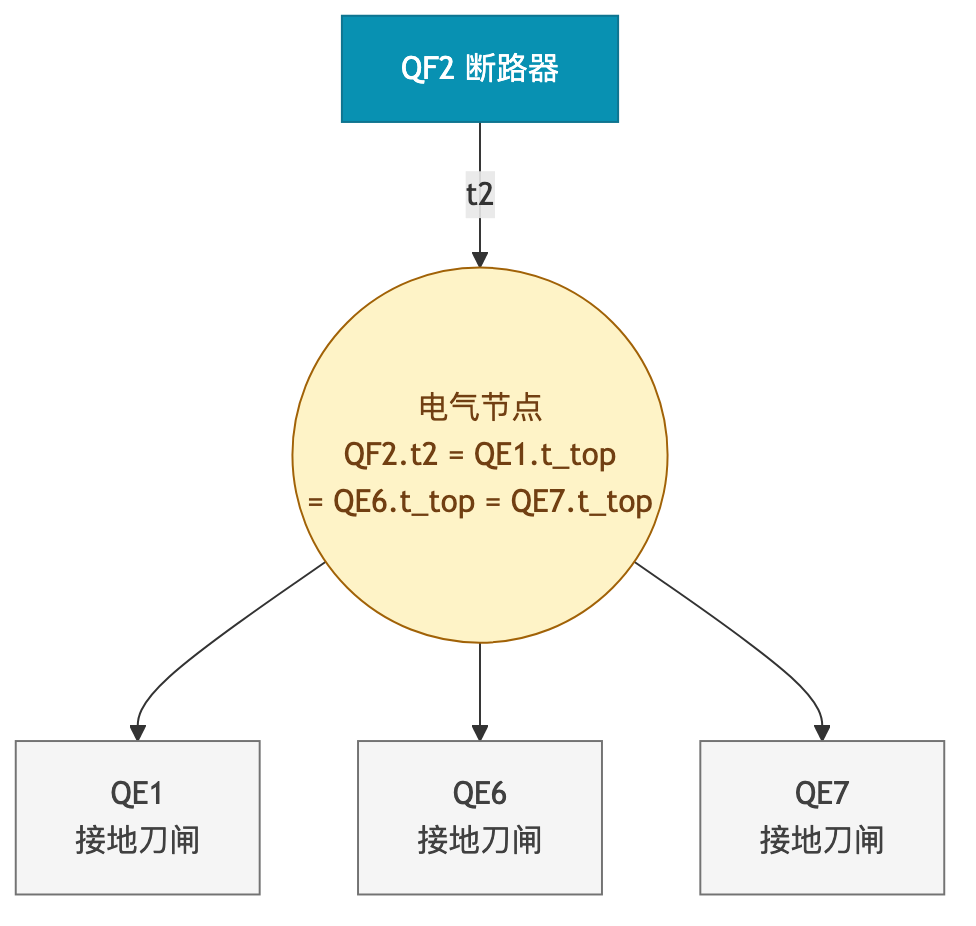
In the data, this is 4 terminals on one node; physically, it’s a short horizontal bar below QF2 connecting three earthing switches in parallel.
The fix is to treat nodes as first-class citizens. For each electrical node, first collect the already-placed terminals as anchor candidates; then pick the anchor by voting: for each unplaced element, check which placed terminal it directly co-occurs with in the original connections and give that candidate a vote; the one with the most votes wins. Finally, fan out all unplaced elements perpendicular to the anchor’s lead direction.
Voting may look odd, but it elegantly resolves anchor ambiguity. Say several taps connect to the same busbar: which one should a new component point to? Letting “co-occurrence in the original connections” arbitrate is far more reliable than “first come, first served” in BFS order.
Around all of this is a fixed-point loop: each round places everything that can be placed, and newly placed elements become anchors for unplaced elements further down in the next round. This sidesteps the depth-first vs. breadth-first trade-off: as long as there’s progress, run another round; when there’s none, stop.
The subtleties of slots
The ordering of slots below a busbar hides a few details too.
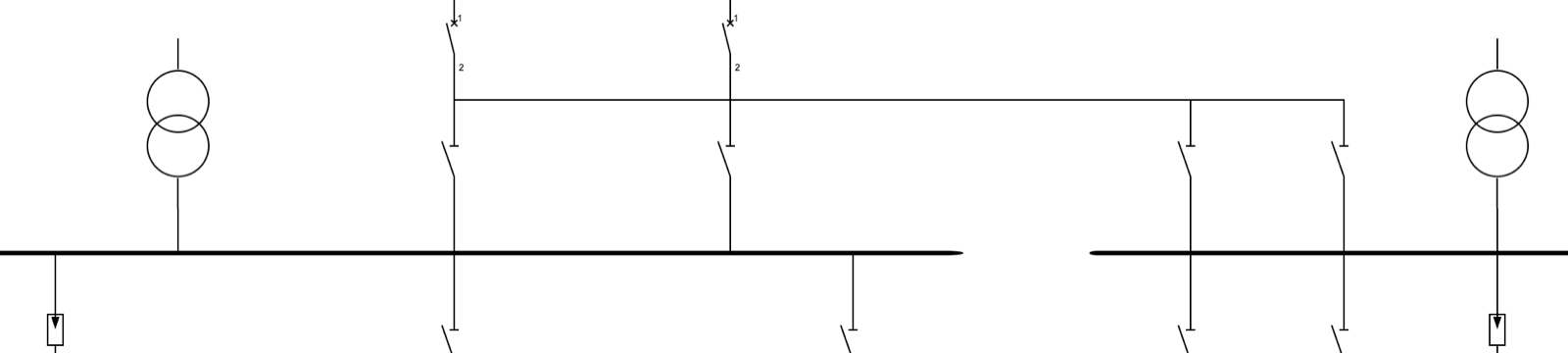
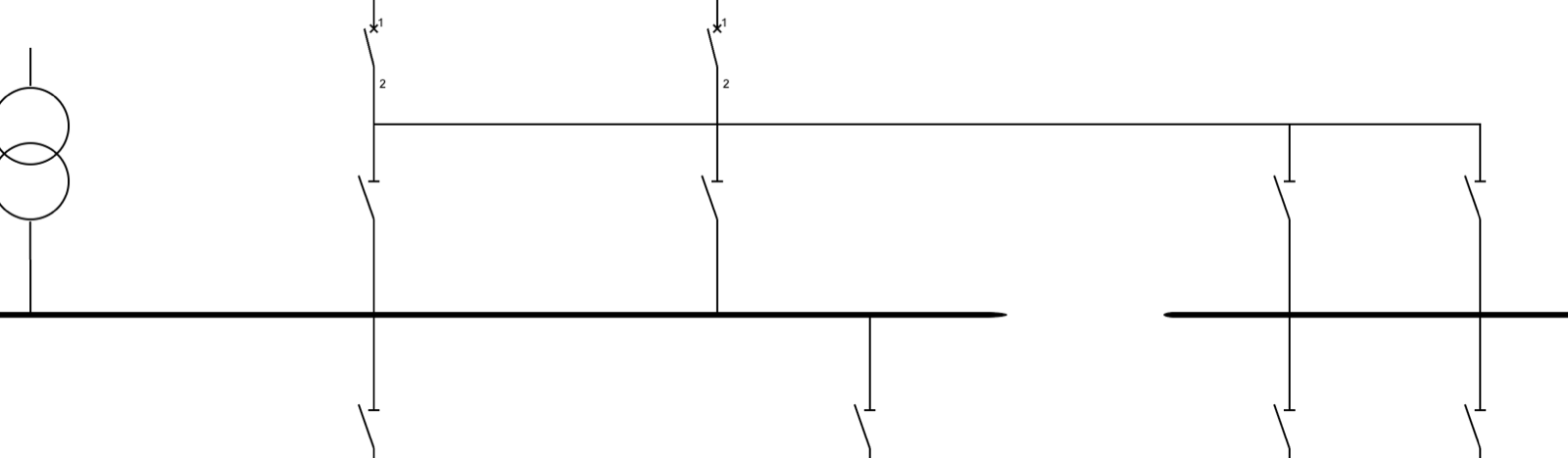
The most obvious approach is to spread taps evenly in their order in the source data. But that breaks down when there are horizontal connections (bus ties) between busbars: the head of a bus-tie chain wants to land on the end closest to the other busbar. For example, QS_BT_I on BI should be on BI’s right side (next to BII), and QS_BT_II on BII should be on BII’s left side (next to BI), so the bus-tie line is as short as possible.
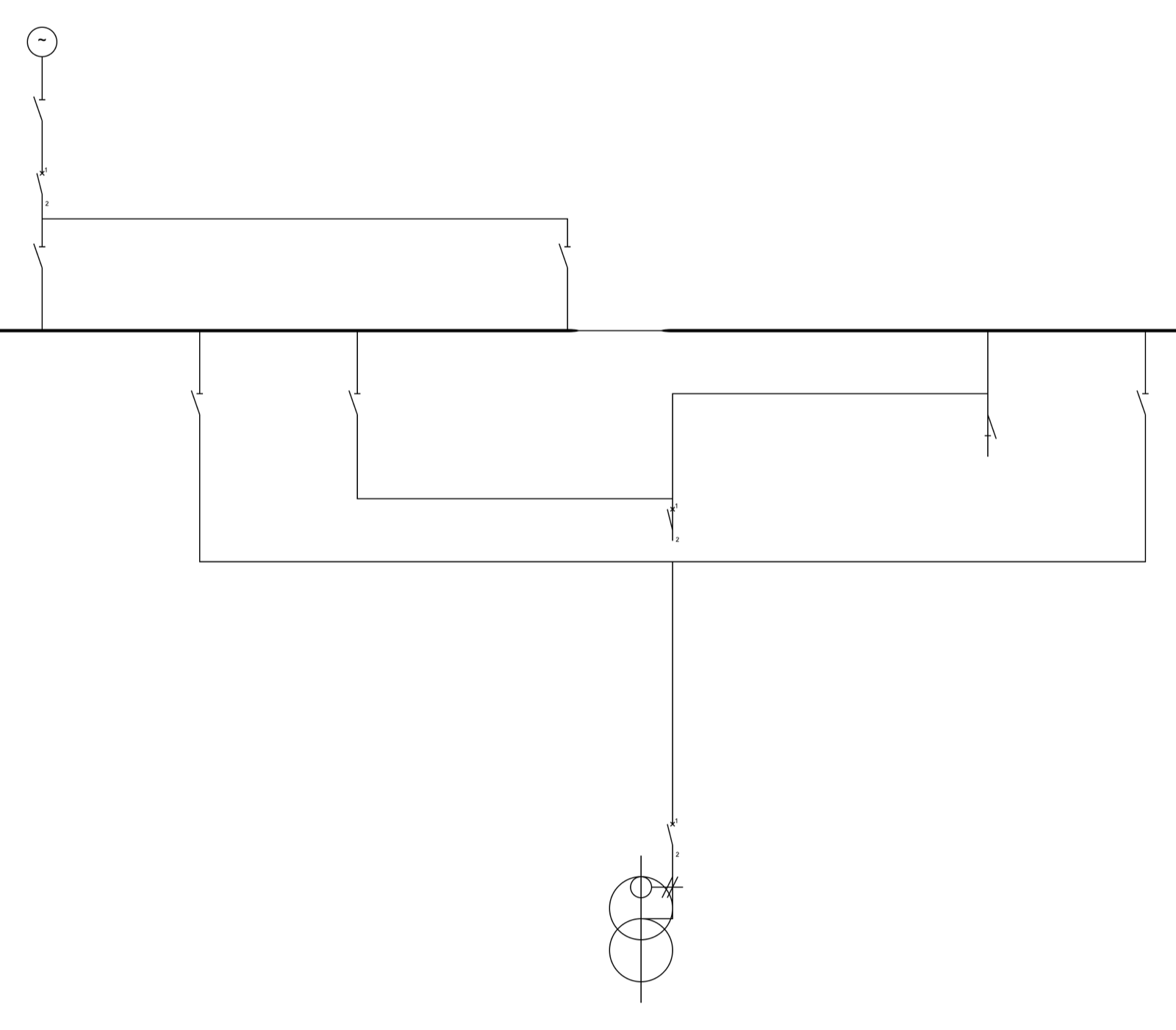
So I introduced the idea of a “target X”: each tap runs BFS along the connection graph to find the nearest other already-placed busbar, and uses that busbar’s X as the tap’s preferred position. Then slots are sorted by preference in ascending order and assigned left to right.
But there’s still a tiebreak problem: if a wide slot (a transformer entry, possibly 800+ px) and a narrow slot (a bus-tie switch, 80 px) prefer the same direction, which goes first? The answer is wide ones in the middle, narrow ones at the extremes. Only when a narrow slot is pushed to the edge can it truly sit close to the other busbar; if the wide slot takes the edge position first, its center still can’t reach the edge, and it squeezes the narrow slot into the middle. I stared at the output for quite a while before this rule clicked.
Complex cases: three-busbar transformers and horizontal bus ties
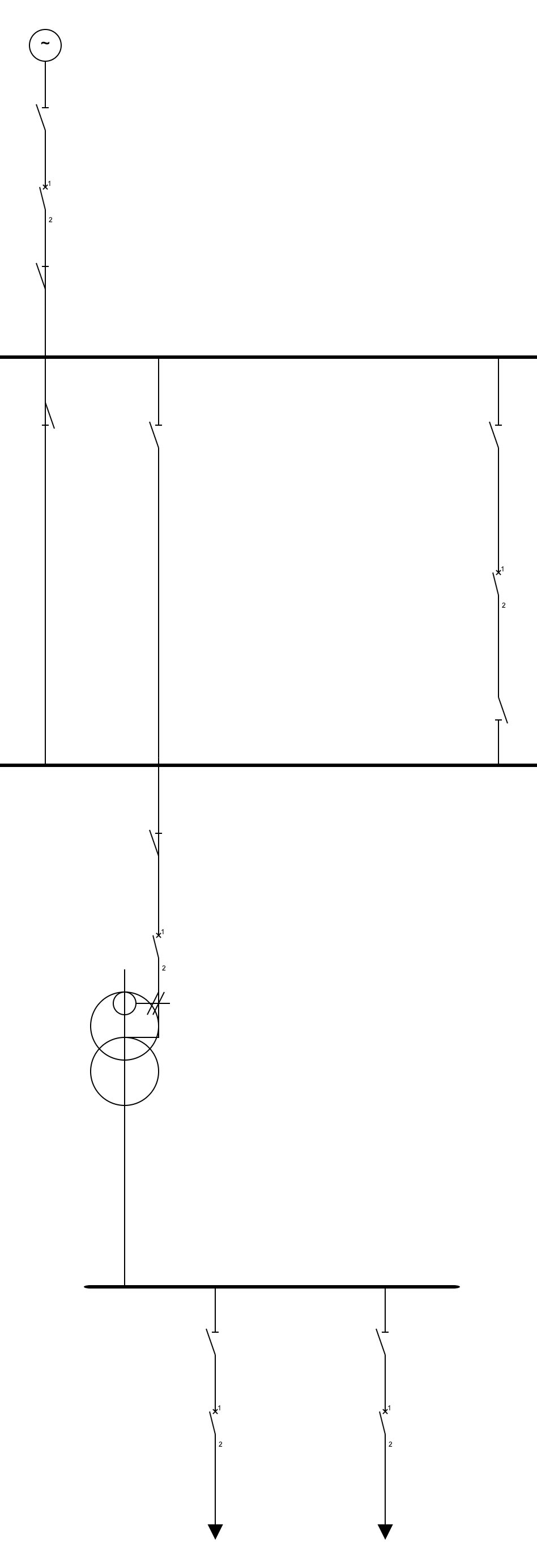
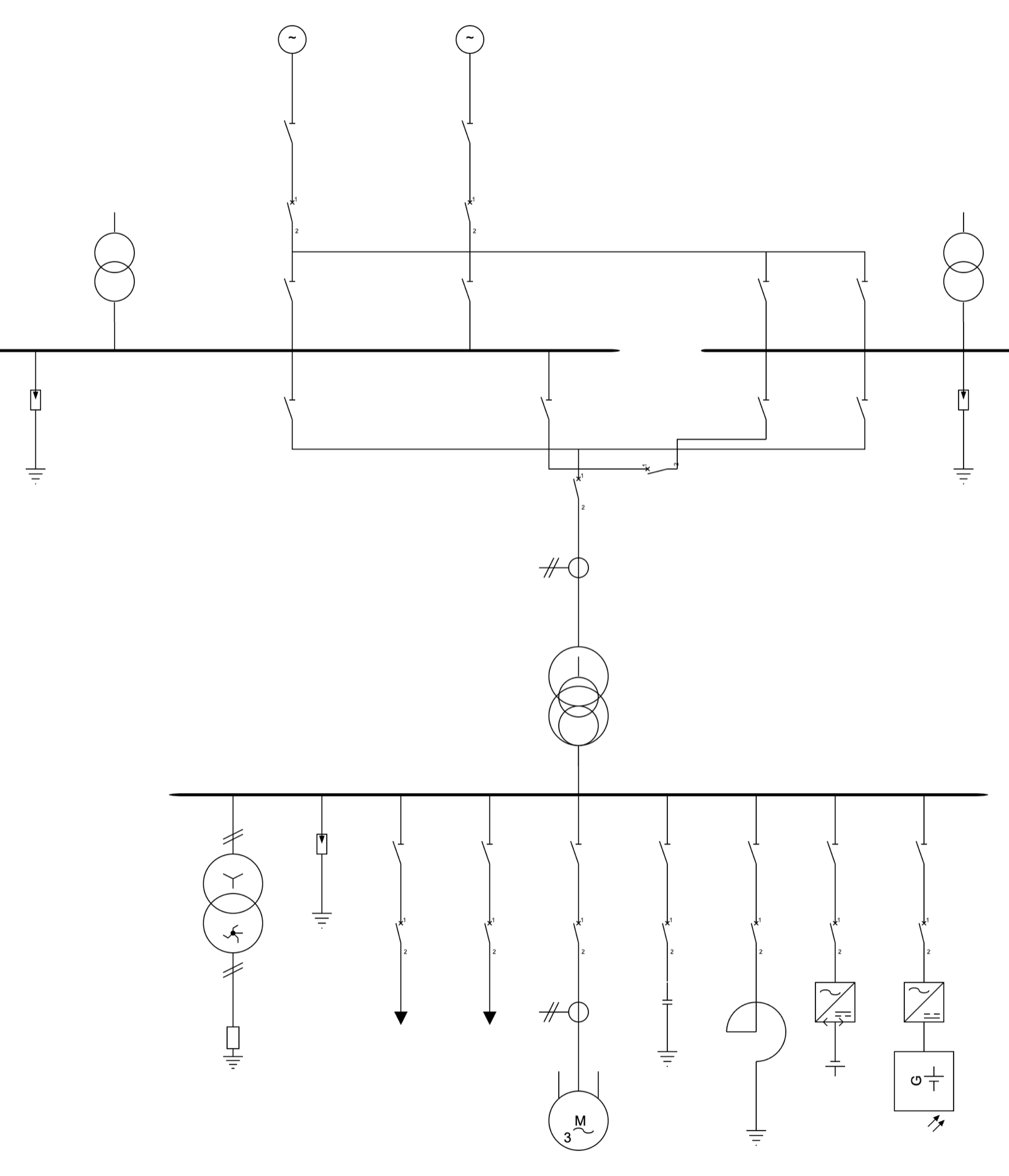
Once the algorithm stabilized, I started testing it against a realistic fixture: a 220 kV double busbar + bus tie + main transformer + 35 kV busbar + multiple feeders. That’s when a few new problems surfaced.
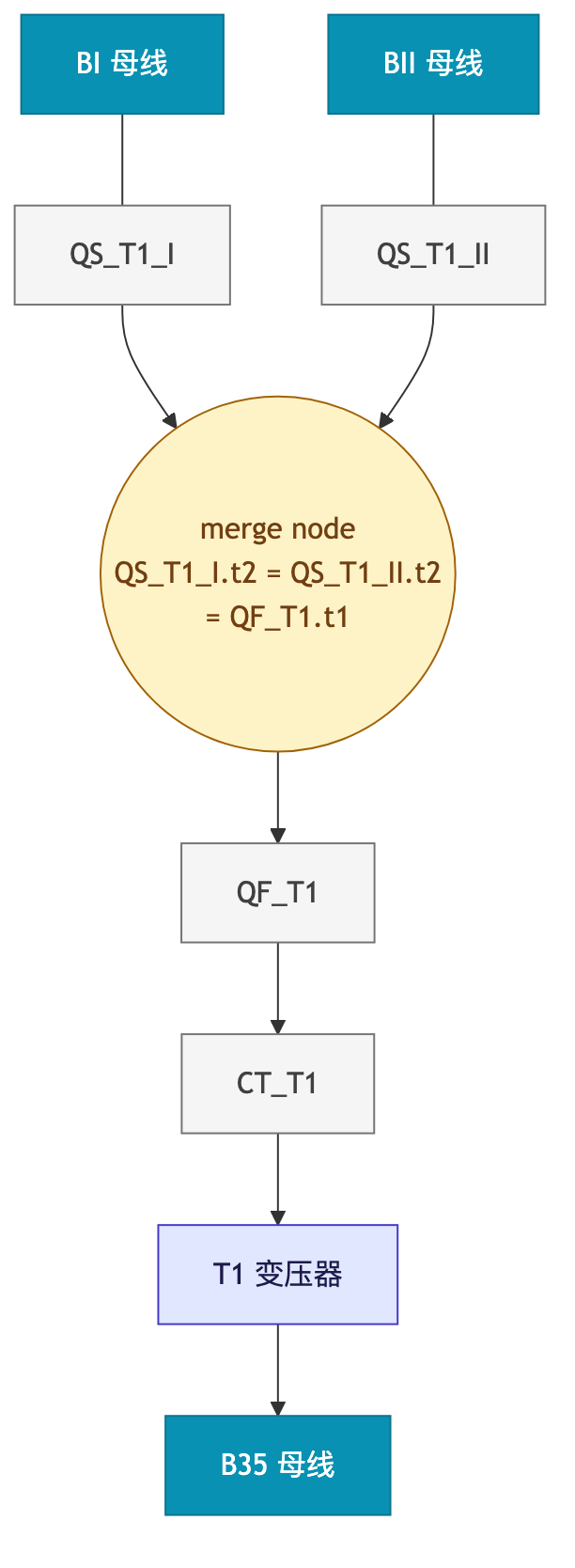
First: the 3-bus transformer. The main transformer T1 hanging off the double busbar actually connects through two disconnectors (QS_T1_I to BI, QS_T1_II to BII) that merge at one end of T1. Physically it’s a Y-shaped fork:
Early on, BFS stopped at the first busbar it reached, so T1 was registered as a 2-bus linker. QS_T1_II on the other side degraded into an ordinary tap of BII, and its lead was forced to cut diagonally across to QF_T1’s column, producing an ugly long diagonal line.
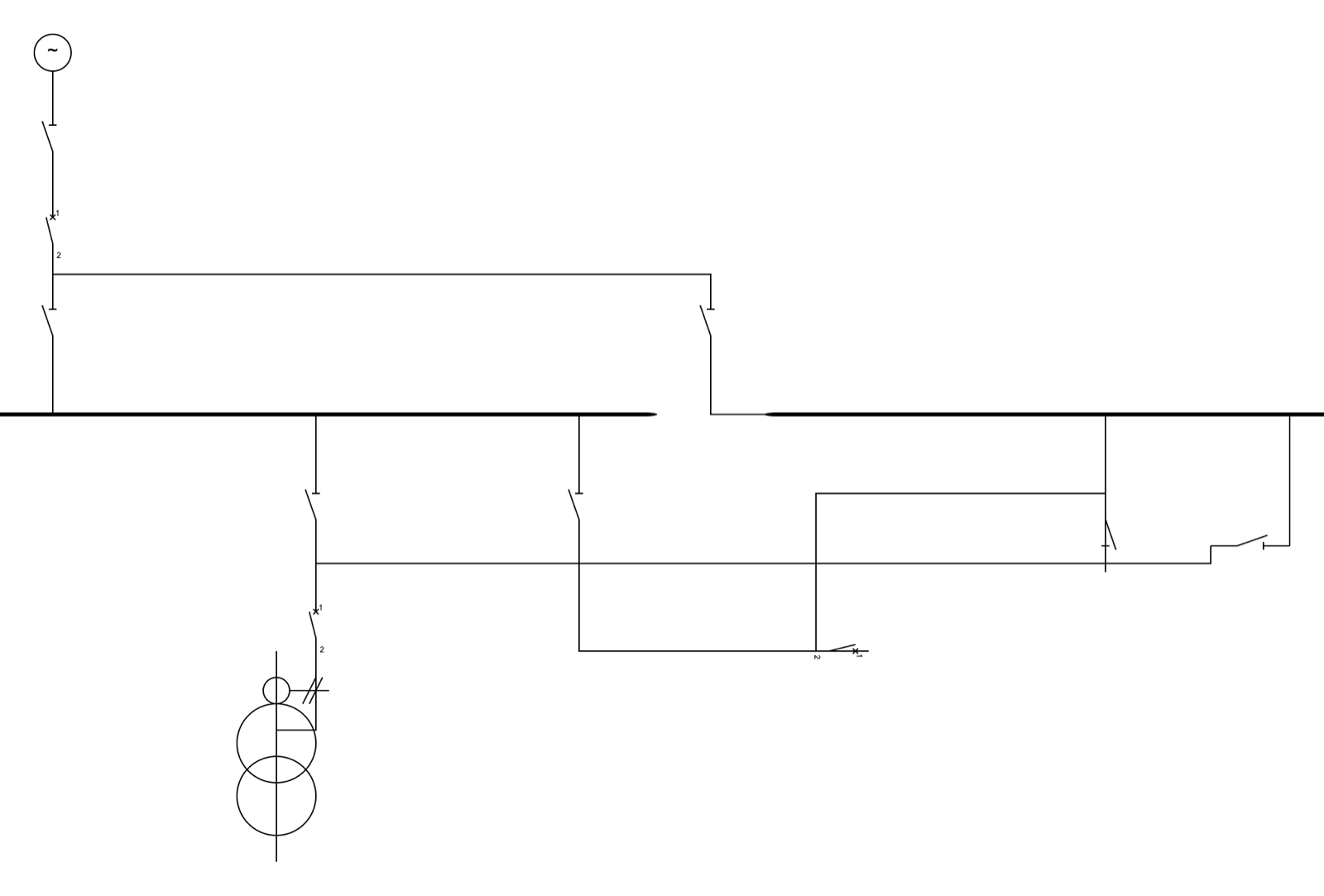
The fix had two steps. First, change the BFS to keep going and traverse the whole graph, so T1’s attachments are recorded truthfully as three edges: [{BI, t1}, {BII, t1}, {B35, t2}]. Then make placeLinker recognize multiple upstream attachments: find all chain heads on the same level and place the linker at the midpoint of their X coordinates.
That only fixed the linker’s own position. The other components on the chain (QF_T1, CT_T1) were still sitting in BI’s column, and moving T1 to the midpoint actually added a 320px horizontal lead from CT_T1.t2 → T1.t1. So I added a reverse chain walk: starting from the linker, step along the chain toward the busbar, pinning each component to the linker’s X column, until hitting a multi-terminal node (merge node). After that, the rest is left to auto-route: QS_T1_I.t2 / QS_T1_II.t2 / QF_T1.t1 are three terminals on the same node, rendered as a horizontal rake with a tee hanging down.
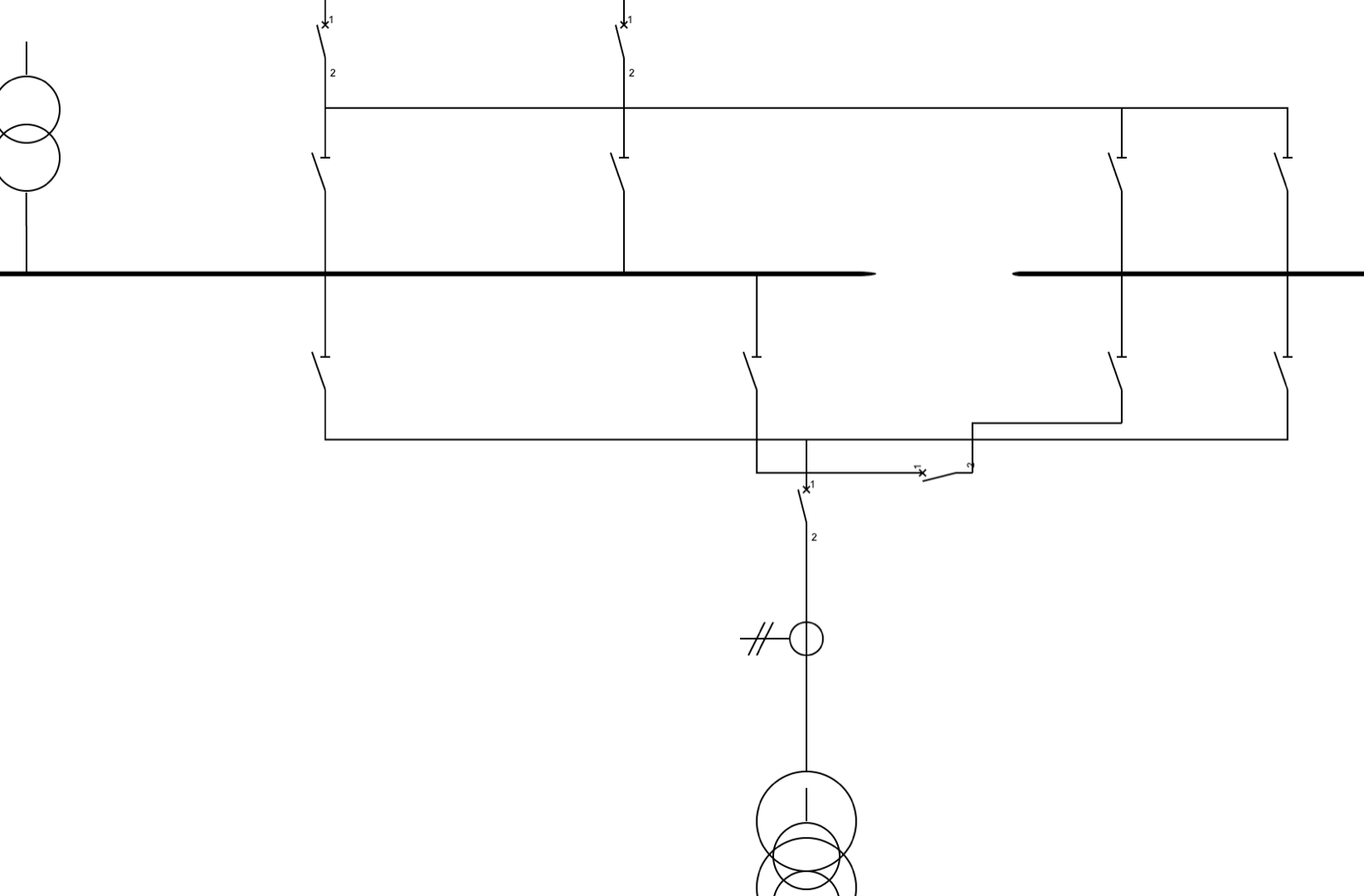
Second: laying the bus tie horizontally. A bus tie is a horizontal linker, and physically QF_BT lies on its side. But the default chain placement runs vertically, so QF_BT ended up inexplicably hanging below QS_BT_I, leaving a 1200px horizontal line on the other side for auto-route to struggle with.
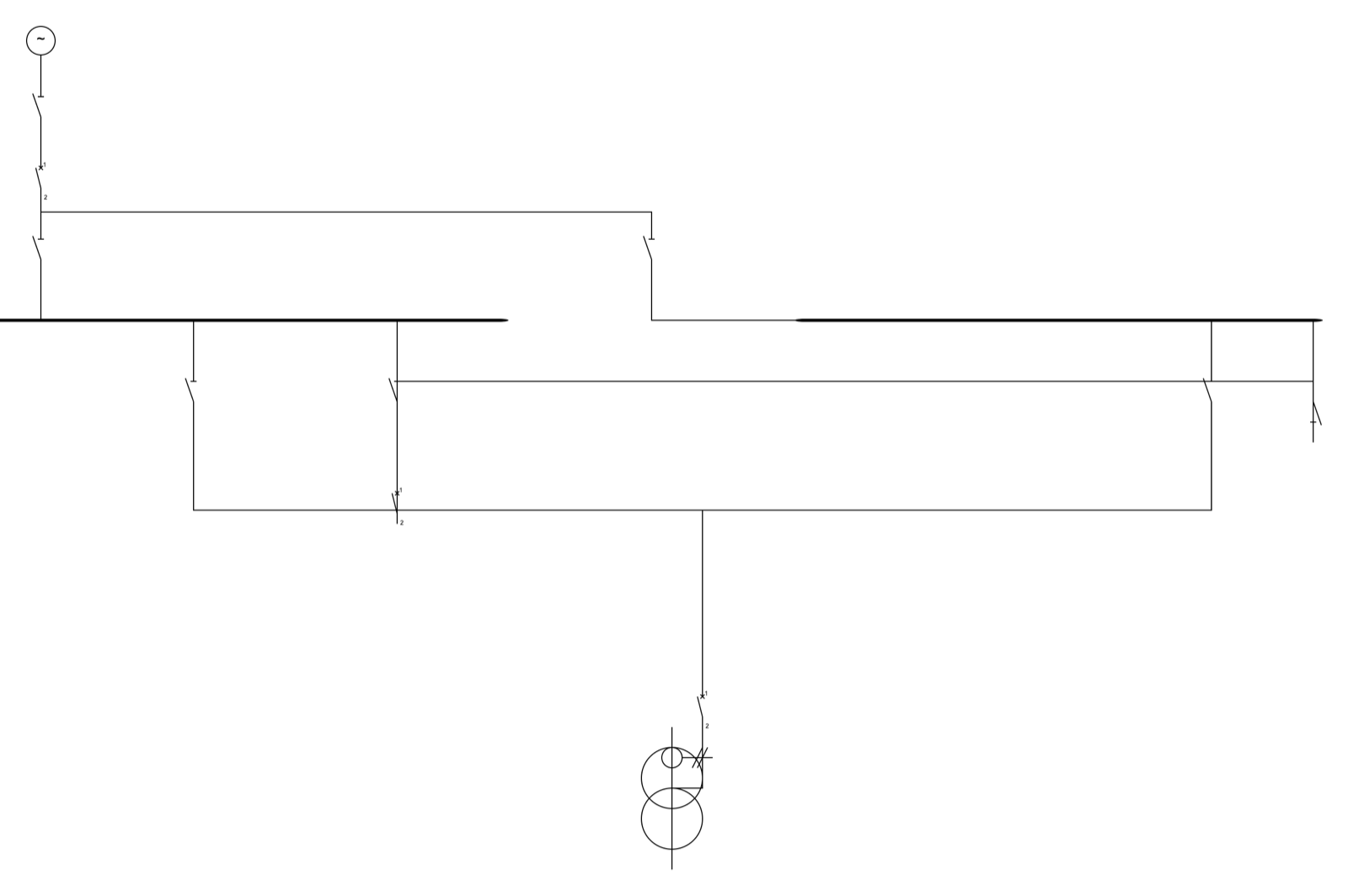
The fix was direct: give horizontal linkers their own placement pass. Rotate 90°/270° (depending on which terminal connects to the left busbar), place it at the X midpoint between the two busbars, with Y at the end of the chain extent. QS_BT_I on the BI side still dutifully hangs as a tap of BI, and QF_BT lies on its side between the two disconnectors, with a short L-shaped lead of about 90px on each side.
Together, these two fixes made the complex fixture look “like a substation” for the first time:
Remaining limitations
To be honest, the algorithm isn’t perfect yet. A few things I know about but haven’t touched for now:
Hard-coded aesthetic rules: Many aesthetic conventions (like “the earth symbol always goes at the very end of a chain” or “surge arresters sit close to the busbar”) are currently implemented implicitly through terminal positions and component library definitions. Supporting non-standard components or custom symbols would require a more explicit rule system.
Auto-routing: Auto-layout only decides where components go; the actual path of each wire is the job of a separate algorithm (autoroute). Right now the two work independently and sometimes fight (for instance, if layout puts two terminals far apart, routing can’t draw clean right-angle lines). Ideally the two should be optimized jointly.
Asymmetric chains: For 3-bus transformers I assume both chains are the same length (in practice they’re usually symmetric). If one side has an extra CT and the other doesn’t, the shorter chain is left with a stub. This could be filled by proportionally stretching the chain spacing, but I haven’t done it yet.
Bay-level alignment: A single feeder (disconnector → breaker → load) currently has its X computed step by step down from the busbar; there’s no first-class notion of a “bay.” In large substations it’s reasonable to want every component of an outgoing bay to share a single X axis, but adding that constraint to the existing recursive span computation would mean rewriting a fair amount.
Wrapping up
Building this gave me renewed respect for “getting a seemingly simple little problem right.”
Every time I thought I had it figured out, a new case would break it: three busbars, bus ties, parallel branches, different terminal orientations, Y-shaped forks. Each new case was a mirror reflecting where the previous model was incomplete. Only once the abstractions of “terminal,” “chain,” “electrical node,” “tier,” “orientation tag” and “merge node” were solidly in place did the code gradually stabilize, to the point where new cases no longer needed patches and simply worked by following the model.
Looking back, the most useful lesson is this: get the domain concepts right first, then write the algorithm. Don’t prop it up with collision detection or tune it with magic numbers; just describe the problem itself clearly. For the rest, undergraduate algorithms material like BFS, union-find and bottom-up recursion is enough.
The code is at NovaShang/sldeditor. Feedback and critique welcome.