Turning a Screenshot into a Live Computer: Why I Built Webulator
Oct 11, 2026 · Emulation · WebAssembly · Webulator
Live demo: novashang.github.io/webulator · Source: NovaShang/webulator
How it started: an operating system museum
For a while I have wanted to build an operating system museum you can actually use. The working name is OS Museum: interfaces from decades of operating systems laid out by time and by component, say the text editor from 1984 to today, with Mac and Windows side by side. I already have a collection to start from: x86 virtual machines in VMware format, classic Mac images for Mini vMac, and a few hundred screenshots sorted by component and by system.
Existing projects each solve half of this. PCjs, v86 and Infinite Mac run old systems in the browser; other sites are galleries of screenshots. I wanted the two in one place: the page shows a screenshot of a window, you click it, and it comes alive where it is. The cursor starts blinking, you can type and open menus. Around the window it is still a web page; no full desktop pops up.
That effect rests on one idea: the screenshot is the first frame of a restored snapshot. Each exhibit is produced with both a machine snapshot and the first frame after restoring it. The page shows the image, restores the snapshot in the background when you click, and swaps the live canvas in. The two must match to the pixel, or the swap visibly jumps.
So the whole thing comes down to a few concrete questions:
- How long does it take to restore a machine snapshot in a browser, and how big is the snapshot?
- Can the first frame after a restore be exactly the screen at save time?
- The classic Mac emulators have no save state at all. Can they be given one?
- Mac and Windows run on completely different emulators. Can the code above them ignore that?
Webulator is my answer to the last one.
One API, strictly equal
Webulator wraps several WebAssembly emulators behind one browser API. Its first user is OS Museum, but the API does not depend on the museum. It looks like this:
const m = await Machine.create({
  profile: await loadProfile(".../sheepshaver-g3bw-macos904.json"),
  disks: [{ id: "hd0", source: { manifest: ".../macos904.manifest.json" } }],
  snapshot: { url: ".../finder.webusnap" },   // start from a saved state instead of booting
  display: canvas,
});
m.input.pointer.moveTo(20, 8);                 // exact, in guest pixels
m.input.pointer.button(0, true);
const state = await m.saveState();             // restore it later, in a fresh page
To run Windows 98 instead, you change the profile and nothing else. When I wrote the spec I set myself a few rules, and every trade-off since follows from them:
- Strictly equal capabilities, not a lowest common denominator. Every capability in the contract is fully implemented by every core and passes the same conformance tests. If one core cannot do something, it stays out of the current version until all of them can. There are no optional capabilities.
- Capabilities are separate from hardware properties. “Can it save state” and “does the pointer land exactly” are capabilities and must be equal. “68k or x86”, “how many mouse buttons”, “is there a wheel” are properties of the emulated machine: the API exposes them the same way, but the values differ. A right click on a one-button Mac throws an error instead of being quietly remapped.
- Snapshots are first-class. “A screenshot that instantly becomes a live machine” is the main reason the library exists.
- Leave emulator source alone where possible. Use build flags and the host runtime first. When a patch is unavoidable, keep it small and pinned to an upstream version.
The v1 contract has eight capabilities: lifecycle, screen, keyboard, pointer, disks, snapshots, a virtual clock, and headless operation. Audio, swapping media while running, networking and the clipboard are not in v1, each because at least one core cannot do it yet or it has not been verified. Mini vMac has no Ethernet, for example, so networking waits for a later version.
Four cores, three CPU families
| Core | Arch | Machine | System | License |
|---|---|---|---|---|
| v86 | x86 | PC | Windows 98 | BSD-2-Clause |
| Mini vMac | 68k | Macintosh Plus | System 6.0.8 | GPL-2.0 |
| Basilisk II | 68k | Quadra 650 | System 7.5.3 | GPL-2.0 |
| SheepShaver | PowerPC | Power Macintosh G3 | Mac OS 9.0.4 | GPL-2.0 |
v86 comes straight from its npm package. The three Mac cores are the Infinite Mac project’s Emscripten builds, and the Mac disk images come from Infinite Mac too; the Windows 98 image is the one from the v86 demo site.
Each machine gets its own worker. The Mac emulators run a main loop that blocks the worker thread, so a running machine never sees a postMessage. All real-time control from the page (pause, snapshot requests, input) therefore goes through a control block and an input ring buffer in a SharedArrayBuffer, which requires the page to be cross-origin isolated.
Disk images are split into 256 KB chunks named by content hash and read lazily over the network. Guest writes go to a 4 KB copy-on-write overlay that can be exported, imported, and is included in snapshots.
Why v86 for x86
Before starting I compared the two ways to run x86 in a browser, v86 and qemu-wasm, with native QEMU (pure TCG translation, no hardware virtualisation) as a reference. Host: Apple M2, headless Chromium. Guest: the Windows 98 disk from the v86 demo, 128 MB RAM.
The CPU micro-benchmark is the same 512-byte boot floppy on every engine, running a fixed 8-instruction loop timed against the guest clock (higher is better):
| Engine | 32-bit protected mode | vs native QEMU |
|---|---|---|
| Native QEMU (TCG) | 1,413,264 | 1.00× |
| v86 | 718,185 | 0.51× |
| qemu-wasm | 353,178 | 0.25× |
Windows 98 (seconds, median, lower is better):
| Engine | Boot to desktop | Start menu opens | Notepad opens | Snapshot restore |
|---|---|---|---|---|
| Native QEMU (TCG) | 13.71 | 0.51 | 0.43 | 0.04 |
| v86 | 13.89 | 0.22 | 0.13 | 0.04 |
| qemu-wasm | 32.95 | 1.75 | 1.74 | 0.29 |
The engine download is 0.4 MB gzipped for v86 and 14.8 MB for qemu-wasm.
The verdict was clear. v86 runs its CPU loop at about half the speed of native QEMU, matches it on Win98 boot (boot is mostly disk and timers), and is 35 times smaller to download. Its UI numbers even beat native QEMU, partly because reading v86’s canvas is cheaper than QEMU’s screendump, so I don’t count that as v86 being faster. One result reassured me: both v86 and native QEMU restore a snapshot in about 40 ms in-process. Once the state is in memory, waking an exhibit is effectively instant. The real cost is getting the snapshot there.
qemu-wasm was not ready to be the main x86 engine. Getting a picture out of it took two rebuilds, and in the end the screen could only be read through a monitor command. It stays on the research track, for things v86 cannot do.
Snapshots: four machines wake instantly
The demo page has four machines. By default they don’t boot; they download a saved state and restore it into a fresh WebAssembly instance. Measured in the conformance suite (headless Chromium, Apple M2):
| Profile | Cold boot | Snapshot (gzip) | Restore → first frame | First frame vs saved |
|---|---|---|---|---|
| Mini vMac · System 6.0.8 | 2.7 s | 0.57 MB | 46–85 ms | identical |
| Basilisk II · System 7.5.3 | 4.0 s | 2.0 MB | 77–140 ms | identical |
| SheepShaver · Mac OS 9.0.4 | 27.9 s | 11.1 MB | 158–217 ms | identical |
| v86 · Windows 98 | 19.1 s | 12.4 MB | 137–170 ms | identical |
Mac OS 9 takes almost half a minute to boot cold, and under a quarter of a second to restore, with a first frame that differs from the saved screen by 0 pixels. That is exactly the “screenshot comes alive” OS Museum needs.
v86 has save_state() built in; it just had to be wired up. The hard part was the three Mac cores: blocking main loops, no save state. For the save states I did not change their source in the end, only their build flags. Emscripten’s Asyncify unwinds the call stack into linear memory at the input poll, and then the whole memory is saved. Along the way it turned out that if the guest can “see” the time between save and restore, Basilisk II comes back so sluggish that opening Calculator takes 5 to 8 seconds, so it needs a virtual clock. There is a lot of detail there, so it has its own post: Save States for Classic Mac Emulators.
Every snapshot carries the core’s build hash, and a restore into a different build is refused outright. The memory layout and the rewind entry belong to one exact build, so compatibility is not possible. Exhibits are generated by script anyway: when a core is rebuilt, the snapshots are regenerated.
Conformance: five systems type the same line
“Strictly equal” means nothing if it lives only in a document. Every profile has to pass the same tests, run in headless Chromium driven by Playwright:
| # | What it checks |
|---|---|
| T1 | Cold boot to a settled desktop |
| T2 | Save → destroy → restore into a new worker, first frame 0 px different, 5 times |
| T3 | Alive after restore: a menu opens, an app opens |
| T4 | Restored after a gap of at least 60 s, responds like a fresh restore |
| T5 | Pause 10 s: the guest clock does not move, no frames |
| T6 | moveTo 20 random points, the cursor lands exactly every time |
| T7 | type() all 95 printable ASCII characters, compared with a golden image |
| T8 | Export the disk overlay, boot it in a new machine, the written files are there |
| T9 | Request a snapshot while the guest is busy booting; it completes and restores |
| T10 | The ~380 key events of T7 sent back to back, none lost |
| T11 | T1 to T3 with no display attached |
| T12 | Every disk fetch delayed 400 ms; no frame gap of 200 ms while the pointer moves |
All four profiles pass all twelve.
T7 is my favourite. Each system opens a text editor and the same type() call enters the same characters: all printable ASCII from ! to ~. Only pixels that stay still for 1.5 seconds are compared (so a blinking caret doesn’t count), against a golden image recorded once and checked by eye. Here are the five golden images: TeachText on System 6, Stickies on System 7.5 and Mac OS 9, Notepad on Windows 98 and XP. Notepad does not wrap by default, so there the line is broken every 32 characters.
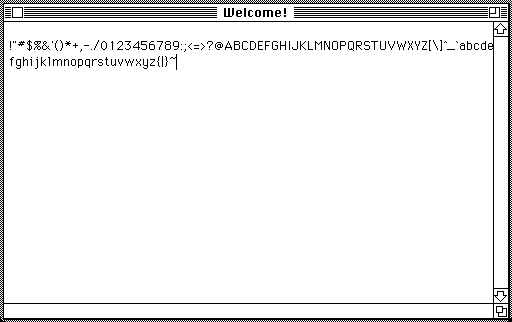
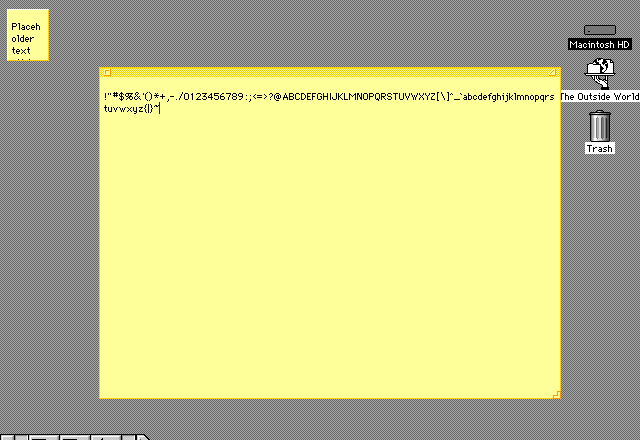
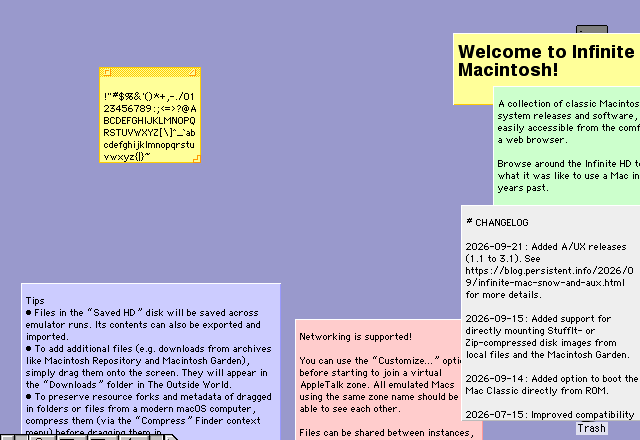
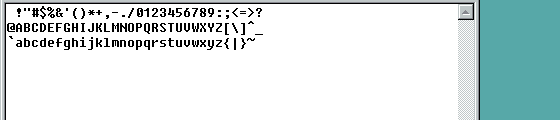

They look unremarkable, but getting them to pass takes work in the keyboard layer. The API names physical keys with W3C KeyboardEvent.code, so the Mac cores need a table to ADB key codes. Characters that need Shift get Shift added. And Basilisk II and SheepShaver buffer only 16 ADB events per 60 Hz interrupt, while Windows 98’s keyboard buffer overflows too. So the adapters send one key event per 8 ms of guest time, in order, and T10 exists to check exactly that.
T6 is fun too. It diffs two frames over a solid-coloured area, before and after the move, finds the cursor’s bounding box, and requires the offset to be the same for all 20 points. A scaling or rounding error would make the offset depend on the position, and the test would fail. The Mac cores take absolute coordinates natively. For v86, Windows 98 needs an absolute-pointer driver (VBMOUSE from VBADOS), and the guest driver only reads the position when a PS/2 interrupt arrives, so every move is preceded by a small non-zero relative move to knock that interrupt loose.
Some things I tripped over
Some problems only show up once things actually run. A few of them:
- The pointer felt sticky on Mac OS 9. While hovering, SheepShaver ran at 7 frames per second with a median latency of 303 ms, yet dragging was smooth. SheepShaver checks its 60 Hz tick (which drives the screen refresh and the cursor) only every 50,000 instructions, and when the guest was idle the worker blocked up to 8 ms per idle call, so ticks came about every 160 ms. While dragging the guest is busy and never takes the idle path. Ending idle waits when the next refresh is due brought it to 46 frames per second and a 35 ms median.
- v86 can’t render more often. I lowered the frame floor for all cores from 16 ms to 12 ms so a slightly early frame isn’t pushed to the next cycle. Not for v86: rendering also flips its vertical-retrace bit, and with a 14 ms threshold Windows 98 hung at its boot logo in 3 of 8 cold boots.
- Windows 98 sometimes hangs at the boot logo. With VBMOUSE installed, about 1 cold boot in 12 hangs. At the hang the IDE has finished a transfer whose interrupt never arrives; the same runtime boots the image without VBMOUSE 12 times out of 12. The likely cause is an early PS/2 mouse interrupt left unacknowledged while VBMOUSE initialises, blocking the lower-priority disk interrupt. Restoring from a snapshot is not affected, which is one more reason to prefer snapshots.
- A slow disk froze the whole machine. With the disks on object storage, each chunk took 0.4 to 0.5 seconds, and the first implementation fetched chunks synchronously on the core’s thread. The guest stood still for every fetch, cursor included. A real machine doesn’t behave like that: while the disk is busy the CPU keeps running and taking interrupts. T12 was added for this; the fix is in the second post.
Next stop: Windows XP and Warcraft III
With four machines working I started pushing towards newer systems. The Windows XP golden image above comes from the fifth profile, added later.
For XP I set myself a more specific goal: Warcraft III on Windows XP, in a browser. First I measured the CPU. Busy, XP on v86 runs at about 250 to 280 MIPS, roughly a 300 to 500 MHz Pentium II/III, right at Warcraft III’s minimum spec (a Pentium III 400). Desktop use is fine; heavy game scenes are another matter.
The bigger problem is graphics. v86’s display is only VGA and VBE, with no 3D hardware at all, and Warcraft III is a Direct3D 8 game. Giving XP a “graphics card” means implementing, inside v86, a virtual GPU that the guest driver recognises, then translating its 3D commands to WebGL2. That work, and the later attempt to bypass the emulated CPU, are in two separate posts: